
When you type something into Google, results appear in less than a second. But behind that simple search box, search engines are doing a lot of complex work.
Think about it — there are billions of web pages on the internet. How does Google know which ones exist? How does it decide which page to show you first when you search for something? And why do some websites appear on page one while others are buried on page ten?
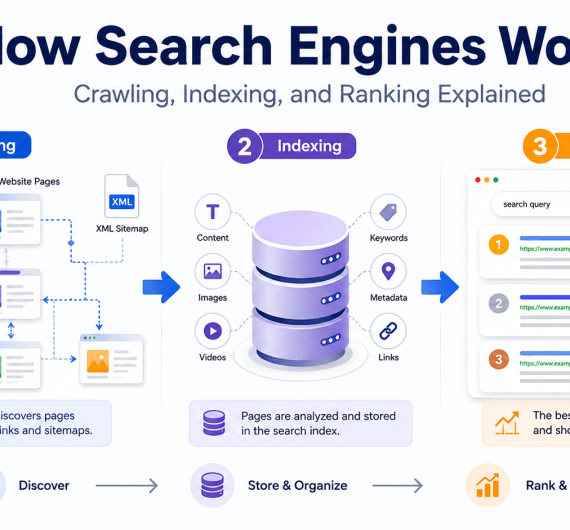
The answer lies in three core steps: crawling, indexing, and ranking.
Understanding how search engines work isn’t just a technical curiosity — it’s one of the most useful things you can learn if you own a website, run a business, or want more people to find you online.
And here’s the most important thing to understand before we dive deeper:
If Google cannot crawl your page, it cannot index it. If it cannot index it, it cannot rank it.
This simple chain is the foundation of every SEO strategy. In this guide, we’ll break it down in a way that’s easy to understand — even if you’re completely new to SEO.
What Are Search Engines?
A search engine is a software system designed to help people find information on the internet. When you type a question or keyword into a search engine, it searches through billions of web pages and shows you the most relevant results.
The most widely used search engine in the world is Google, which handles the vast majority of global searches. Others include Bing, Yahoo, DuckDuckGo, and Baidu.
Search engines exist because the internet is enormous and unstructured. Without them, finding useful information online would be like trying to find a specific book in a library with no shelves, no labels, and no system.
Search engines are, essentially, the librarians of the internet — but they’re extremely fast, constantly learning, and available 24 hours a day.
Why Understanding Search Engines Is Important for SEO
If you run a small business, write a blog, manage a website, or are trying to grow an online presence, understanding how search engines work gives you a real advantage.
Here’s why:
- You’ll know why your website may not be appearing on Google — and how to fix it.
- You’ll understand what Google actually rewards — and be able to create content and a website structure that aligns with it.
- You’ll stop wasting time on tactics that don’t work and focus on what actually improves your visibility.
- You’ll make better decisions about your website, your content, and your digital marketing strategy.
SEO — Search Engine Optimization — is simply the practice of helping search engines discover, understand, and trust your website. Once you understand how search engines work, SEO stops feeling mysterious and starts making logical sense.
How Search Engines Work in 3 Simple Steps
At the core, search engines follow three main stages to do their job.
| Stage | Meaning | Why It Matters |
|---|---|---|
| Crawling | Search engine bots discover and visit web pages | Pages that can’t be crawled will never be found |
| Indexing | Pages are analyzed, stored, and organized in a database | Only indexed pages can appear in search results |
| Ranking | Pages are ordered based on relevance and quality | Ranking determines where your page appears on Google |
These three steps happen in sequence, and they each depend on the previous one. Let’s explore each stage in detail.
What Is Crawling in SEO?
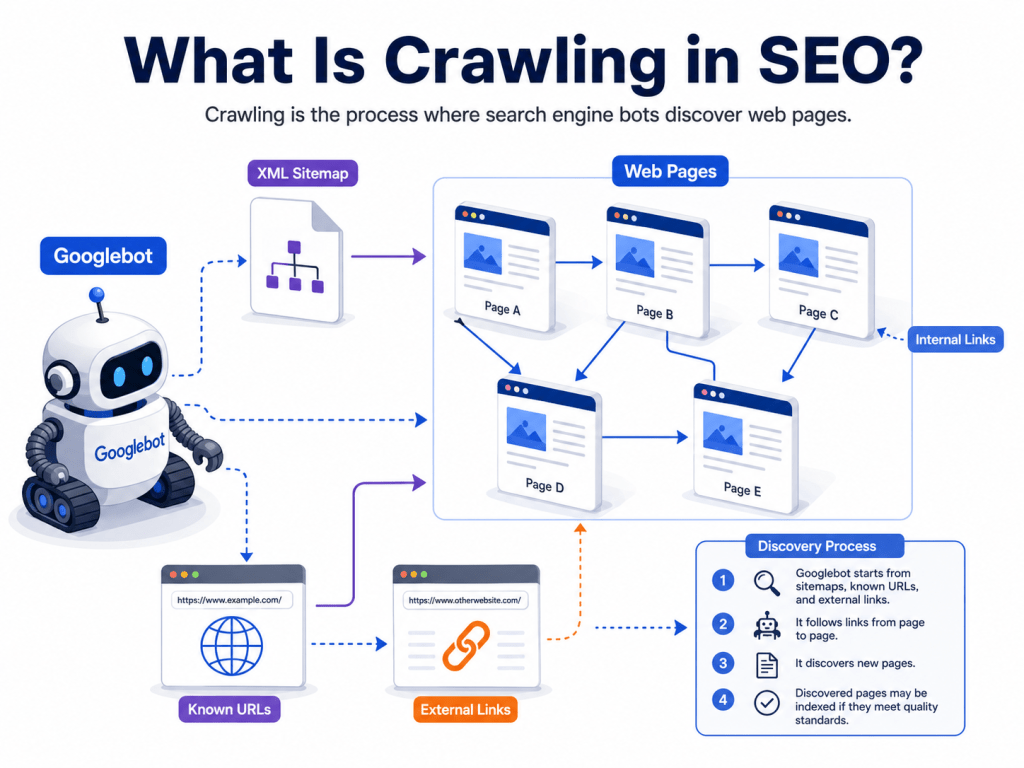
Crawling in SEO is the process by which search engine bots discover and visit web pages on the internet. These bots — often called crawlers, spiders, or web robots — travel across the web by following links from one page to another.
Think of it like a real spider building a web. It starts from one spot, reaches out along threads, and gradually covers more and more ground. Web crawlers do the same — they follow links and visit page after page across billions of websites.
Crawling is the very first step. Without it, Google doesn’t even know your page exists.
How Search Engine Bots Discover New Pages
Search engine bots find new pages in several ways:
- Following links from existing pages — If a known website links to your new page, bots can follow that link and discover you.
- XML Sitemaps — A sitemap is a file that lists all the important pages on your website. Submitting it to Google helps bots find your pages faster.
- Previously crawled URLs — If Google has visited your site before, it will return to check for new content.
- Direct submission — You can manually request Google to crawl specific pages through Google Search Console.
- Backlinks from other websites — When other websites link to yours, Google can discover you through those links.
The more pathways that lead to your pages, the easier it is for crawlers to find them.
What Is Googlebot?
Googlebot is Google’s web crawler — the software that visits web pages and collects information for Google’s index. There are actually different types of Googlebot:
- Googlebot Desktop — simulates a desktop browser visitor
- Googlebot Smartphone — simulates a mobile browser visitor (this is now Google’s primary crawler since Google uses mobile-first indexing)
Googlebot follows the rules you set in your robots.txt file, respects crawl delays, and prioritizes pages based on how valuable and popular they appear to be.
You don’t need to do anything special to attract Googlebot — as long as your website is accessible and has proper signals, it will eventually find you.
How Internal Links Help Crawling
Internal links are links from one page on your website to another page on the same website. They’re incredibly important for crawling because they create pathways that bots can follow to discover all your pages.
Here’s a practical example:
Imagine you run a bakery website. Your homepage links to a “Services” page, which links to a “Custom Cakes” page. When Googlebot visits your homepage, it can follow those links and eventually reach every page on your site.
Without internal links, some pages can become orphan pages — pages that no other page links to. Googlebot may never find them.
Best practices for internal linking:
- Link to important pages from your homepage or main navigation
- Add contextual links within blog posts
- Make sure every new page has at least one link pointing to it from another existing page
What Is an XML Sitemap?
An XML sitemap is a file (usually at yourdomain.com/sitemap.xml) that lists all
the pages you want search engines to crawl and index. Think of it as a map you hand to Google and say, “These are the pages on my website — please visit them.”
Sitemaps are especially helpful when:
- You have a large website with many pages
- Your site has pages that aren’t easily reachable through links
- You’ve recently added new content and want Google to find it quickly
Sitemaps do not guarantee that Google will index your pages — but they significantly improve the chances that your pages get crawled faster.
You can submit your sitemap directly through Google Search Console.
What Is robots.txt?
The robots.txt file is a text file on your website that tells search engine bots which pages they are allowed or not allowed to crawl. It’s like a sign on the door: “Crawlers welcome here” or “Please don’t enter.”
For example, if you have a backend admin panel, a thank-you page, or duplicate internal filters you don’t want Google to waste time on, you can use robots.txt to block those.
Important: Blocking a page in robots.txt prevents crawling, but it doesn’t always prevent indexing. If another website links to a blocked page, Google may still list it in results — just without much content. If you want to prevent indexing, use the noindex meta tag instead.
What Is Indexing in SEO?
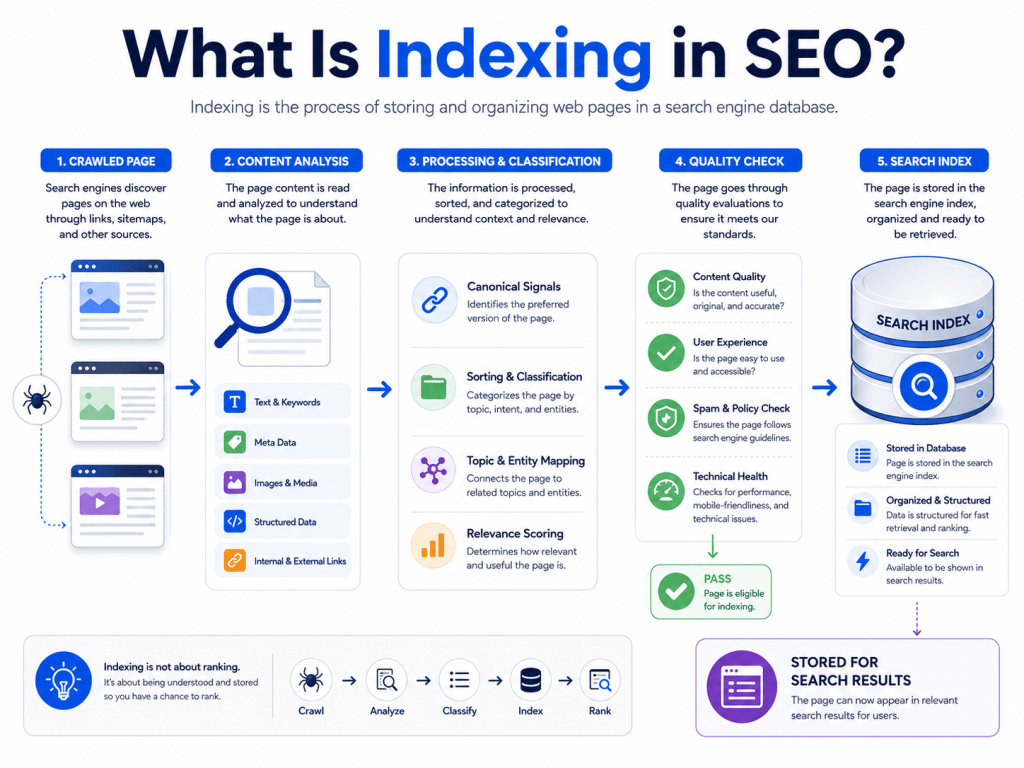
Indexing in SEO is the process where search engines analyze a crawled web page, understand its content, and store it in their database — called the index. Only pages that are in Google’s index can appear in search results.
Think of indexing like a librarian cataloguing a book. Once a book is catalogued, someone can search for it and find it on the shelf. Until it’s catalogued, it simply doesn’t exist in the system.
Crawling = finding the book. Indexing = cataloguing and placing it on the shelf.
What Happens After a Page Is Crawled?
After Googlebot visits a page, Google’s systems do several things:
- Read and understand the content — Google analyzes the text, images, headings, links, and overall structure of the page.
- Determine the topic and relevance — What is this page about? What search queries might it be useful for?
- Check for duplicate content — Is this content unique, or is it very similar to another page? If it’s a duplicate, Google may index only the original.
- Evaluate page quality — Is the content helpful, complete, and trustworthy? Or is it thin and not useful?
- Check canonical signals — If the page has a canonical tag, Google respects the signal about which version of the page to prioritize.
- Decide whether to index — Based on all of the above, Google decides whether the page deserves a place in its index.
Not every crawled page gets indexed. This is one of the most common frustrations for website owners.
Why Some Pages Are Crawled but Not Indexed
This is a very common issue — Google visits your page but doesn’t add it to its index. Here are the most frequent reasons why:
- Thin content — Pages with very little text or value don’t merit a spot in the index.
- Duplicate content — If the page is almost identical to another page (even on your own site), Google may skip indexing it.
- Noindex tag — If your page has
a<meta name="robots" content="noindex">
tag, you’re actively telling Google not to index it. This is sometimes added by mistake. - Blocked by robots.txt — If crawling is blocked, indexing usually can’t happen.
- Low-quality content — Content that doesn’t meet Google’s quality standards may be crawled but not considered worth indexing.
- Technical issues — Slow load times, server errors, or broken pages may prevent proper indexing.
- Weak internal linking — Pages with no internal links pointing to them may be seen as less important.
- Pages not useful enough — Google is increasingly selective about what it indexes. Pages that don’t offer genuine value to users may be excluded.
How to Improve Your Website’s Indexability
Here’s what you can do to give your pages the best chance of being indexed:
- ✅ Write original, helpful, and complete content
- ✅ Use proper internal links so all important pages are reachable
- ✅ Submit an XML sitemap through Google Search Console
- ✅ Check that important pages don’t have a
noindextag - ✅ Avoid thin, duplicate, or very similar pages
- ✅ Fix technical issues (broken pages, server errors, slow loading)
- ✅ Improve page quality — more depth, better formatting, genuine usefulness
- ✅ Use Google Search Console’s URL Inspection tool to check indexing status
What Is Ranking in SEO?
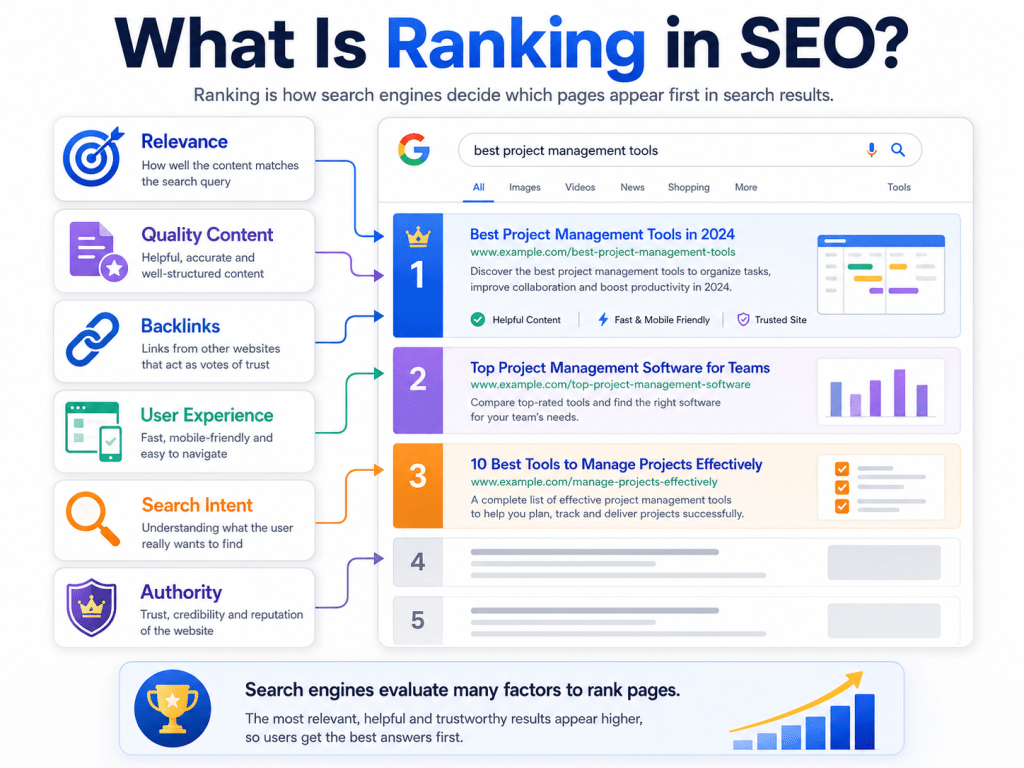
Ranking in SEO is the process by which search engines decide the order in which indexed pages appear in search results for a specific query. The page that appears at position one is considered the most relevant and trustworthy answer by the search engine.
Indexing just means a page is stored in Google’s database. Ranking decides where it appears when someone searches.
Think of it this way: if indexing puts a book on the library shelf, ranking decides which book is placed closest to the entrance and recommended to visitors first.
How Search Engines Decide Which Page Ranks Higher
Google uses a complex algorithm with hundreds of signals to determine rankings. But the core factors come down to:
- Relevance — Does the page match what the user is searching for?
- Search intent — Does the page match why the user is searching, not just the keywords used?
- Content quality — Is the content helpful, complete, accurate, and trustworthy?
- Authority — Do other reputable websites link to this page?
- Page experience — Is the page fast, mobile-friendly, and safe to use?
- Freshness — For time-sensitive topics, is the content recent and up to date?
- E-E-A-T — Does the content demonstrate Experience, Expertise, Authoritativeness, and Trustworthiness?
No single factor alone determines rankings. It’s the combination of many signals that pushes a page toward the top.
Important Google Ranking Factors Explained Simply
| Ranking Factor | What It Means | Why It Matters |
|---|---|---|
| Search Intent | The reason behind a user’s search | Matching intent is more important than matching keywords |
| Helpful Content | Content that genuinely answers user questions | Google rewards pages that help people, not just pages packed with keywords |
| Keyword Relevance | The page covers the topic the user searched for | Signals what your page is about |
| Backlinks | Other websites linking to your page | Acts as a vote of trust and authority |
| Internal Linking | Links from your own site pointing to the page | Helps Google understand the importance of the page |
| Page Speed | How fast the page loads | Slow pages frustrate users and are ranked lower |
| Mobile Friendliness | How well the page works on phones | Google uses mobile-first indexing |
| User Experience | Easy to navigate, clear layout, readable | Good UX keeps users engaged longer |
| Topical Authority | How much your site covers a topic comprehensively | Builds trust and relevance in a niche |
| E-E-A-T | Experience, Expertise, Authoritativeness, Trustworthiness | Especially important for health, finance, and advice content |
What Is Search Intent?
Search intent is the reason behind a user’s search query. Understanding search intent is one of the most important concepts in modern SEO because Google’s primary goal is to satisfy the user’s intent — not just match keywords.
There are four main types of search intent:
| Intent Type | What the User Wants | Example Query |
|---|---|---|
| Informational | To learn something | “how search engines work” |
| Navigational | To go to a specific website | “Skyhoora website” |
| Commercial | To compare options before buying | “best SEO agency in Delhi” |
| Transactional | To complete an action or purchase | “hire SEO agency Delhi” |
If your page is trying to rank for an informational query but your content is entirely a sales pitch, it will likely rank poorly — because it doesn’t match what the user is actually looking for.
Why Content Quality Matters for Ranking
Google has made it very clear: it wants to reward helpful, reliable, people-first content. Pages that are genuinely useful to readers — not just written to impress an algorithm — tend to rank better and stay ranked longer.
Good content is:
- Original — Not copied or rephrased from another source
- Complete — Covers the topic thoroughly and answers the user’s questions
- Accurate — Doesn’t mislead or present false information
- Trustworthy — Written by someone with real knowledge or experience
Content that is thin, generic, keyword-stuffed, or clearly written just to game the algorithm is increasingly penalized by Google’s updates — particularly its Helpful Content System.
Why Website Authority Matters
Authority refers to how much trust and credibility Google assigns to your website based on the links pointing to it from other websites. This concept is connected to backlinks — links from external websites to your pages.
When a reputable website links to yours, it’s essentially saying: “We trust this content enough to point our audience to it.” Google reads this as a positive signal.
For example:
- If a major news website links to your blog post, that’s a powerful trust signal.
- If ten smaller but relevant websites link to your service page, that also builds authority gradually.
Building authority takes time, but it’s one of the most durable and impactful ranking factors in SEO.
Difference Between Crawling, Indexing, and Ranking
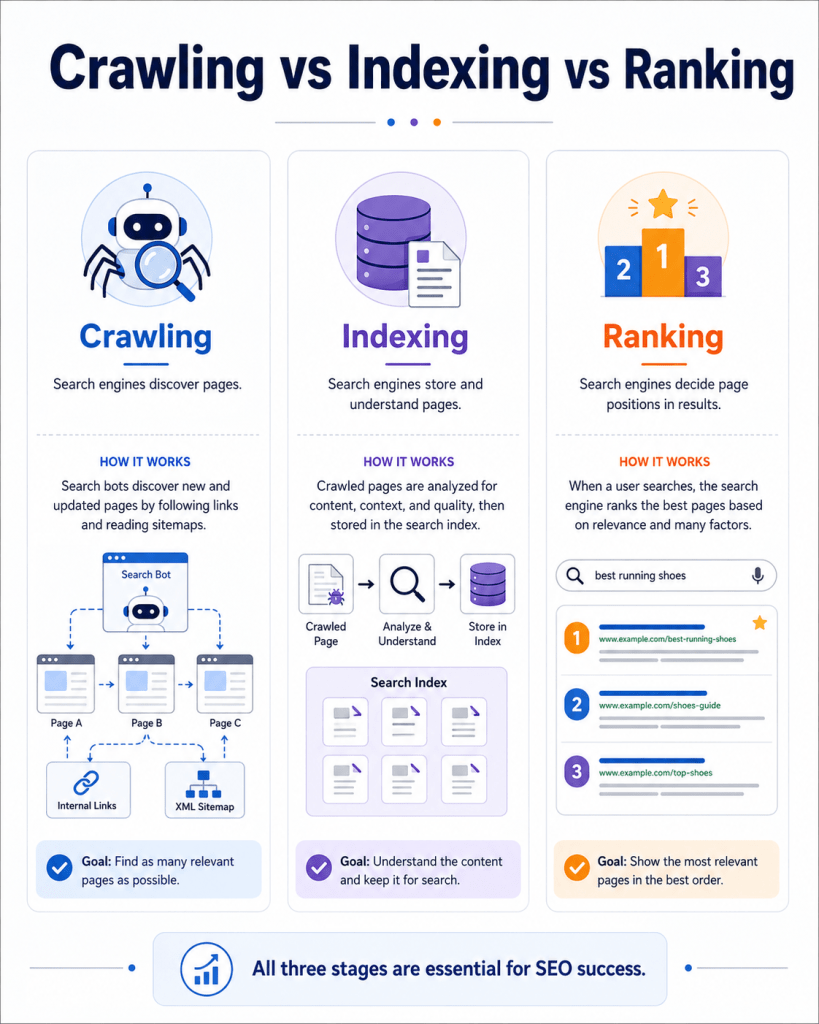
Here’s a complete comparison to make the distinction crystal clear:
| Process | Simple Meaning | Example | SEO Importance |
|---|---|---|---|
| Crawling | Search engine bots visit and read your page | Googlebot visits your new blog post | Pages that aren’t crawled can’t be indexed or ranked |
| Indexing | The page is stored and organized in Google’s database | Your post is added to Google’s library | Only indexed pages can appear in search results |
| Ranking | Google decides where your page appears in search results | Your post appears at position 3 for a keyword | Determines how much organic traffic you receive |
These three processes are connected but distinct. A page can be crawled without being indexed. A page can be indexed without ranking well. But a page cannot rank if it’s not indexed, and it can’t be indexed if it’s not crawled.
Crawling vs Indexing: What Is the Difference?
Crawling is about discovery. Indexing is about storage and understanding.
When Googlebot crawls a page, it visits the page and reads its content — but it hasn’t yet decided to add it to the index. Indexing happens after crawling, when Google analyzes the page’s content, quality, and signals, and then decides to store it in the database.
In simple terms:
- Crawled = Google has visited your page
- Indexed = Google has saved and understood your page and can show it in results
You can check whether your pages are indexed using Google Search Console or by searching site:yourdomain.com in Google.
Indexing vs Ranking: What Is the Difference?
Indexing is about being stored. Ranking is about where you appear.
Every indexed page has an equal right to appear in search results — but ranking is what determines their position. Ranking is a competitive process: for every search query, Google compares all indexed pages related to that topic and orders them by relevance, authority, and quality.
In simple terms:
- Indexed = Your page is in Google’s database
- Ranked = Your page appears at a specific position in search results for a query
A page can be indexed but rank on page 50 — essentially invisible. Improving your ranking requires ongoing work: better content, stronger backlinks, improved user experience, and deeper topical coverage.
How to Help Search Engines Crawl Your Website Better
Use this checklist to make your website easier for bots to crawl:
- ✅ Create a clean site structure — organize your pages logically (Home → Category → Sub-page)
- ✅ Add internal links — connect related pages so bots can navigate your site fully
- ✅ Submit an XML sitemap — upload it to Google Search Console
- ✅ Avoid orphan pages — every page should be linked to from at least one other page
- ✅ Fix broken links — dead links waste crawl budget and frustrate bots
- ✅ Keep important pages close to the homepage — pages that are many clicks deep are harder to find
- ✅ Use descriptive, clean URLs —
yourdomain.com/seo-services-delhi
is better thanyourdomain.com/page?id=123 - ✅ Don’t block important pages in robots.txt by mistake
- ✅ Ensure your server is fast and reliable — bots don’t wait forever
How to Help Search Engines Index Your Pages Better
Getting crawled is step one. Getting indexed is step two. Here’s how to improve indexability:
- ✅ Write original content — don’t copy from other websites or repeat yourself
- ✅ Avoid near-duplicate pages — consolidate similar content instead of creating many thin variations
- ✅ Use canonical tags correctly — tell Google which version of a page is the primary one
- ✅ Check for noindex tags — scan your pages to ensure you haven’t accidentally blocked important ones
- ✅ Improve content depth — shallow content is less likely to be indexed; go deeper on your topics
- ✅ Add structured data / schema markup — helps Google better understand your page’s content
- ✅ Use Google Search Console regularly — check for indexing errors and coverage issues
- ✅ Build internal links to new content — new pages with no internal links can be slow to index
How to Improve Your Chances of Ranking Higher
Ranking well requires consistent effort. Here’s what actually works:
- Match search intent — write content that answers why someone is searching, not just what they typed
- Write better content than your competitors — longer isn’t always better, but more complete and clearer usually is
- Use headings properly — H1 for your title, H2 for main sections, H3 for sub-points
- Optimize your title tag and meta description — these affect click-through rates, which influence rankings
- Improve page speed — use tools like Google PageSpeed Insights to identify and fix slow loading issues
- Build topical authority — create clusters of related content around your main topics
- Earn quality backlinks — reach out to relevant sites, create content worth linking to, and list yourself in relevant directories
- Improve user experience — make your site easy to navigate on all devices
- Update old content regularly — refreshing outdated pages can improve rankings for existing content
- Use Google Search Console — it shows you which queries are bringing traffic and where you can improve
Common SEO Mistakes That Stop Pages from Ranking
Avoid these common errors that hold websites back:
- ❌ Blocking pages by mistake in robots.txt or with noindex tags
- ❌ Weak, thin content that doesn’t genuinely answer the user’s question
- ❌ Keyword stuffing — repeating a keyword too many times makes content unreadable and can trigger penalties
- ❌ No internal links — leaving important pages disconnected
- ❌ Poor mobile experience — a website that doesn’t work well on phones loses a huge portion of users
- ❌ Slow website — even one or two extra seconds of loading time can significantly hurt rankings and conversions
- ❌ Duplicate content — publishing very similar pages confuses Google about which to rank
- ❌ Ignoring search intent — targeting a keyword but not serving what users actually need
- ❌ Not using Google Search Console — flying blind without data on how Google sees your site
- ❌ Expecting fast results — SEO takes time. Abandoning it too early is one of the biggest mistakes
Simple Example: How a Blog Post Gets Found by Google
Let’s walk through a real-world example to bring all three stages together.
Imagine you run a small catering business in Delhi, and you publish a blog post titled “10 Budget-Friendly Wedding Catering Ideas in Delhi.”
Here’s what happens step by step:
1. You publish the blog post. Your post goes live on your website. At this point, Google doesn’t know it exists yet.
2. Google discovers it. You’ve submitted a sitemap through Google Search Console. Google’s crawler sees the new URL in your sitemap. Alternatively, your homepage links to the blog, so when Googlebot visits your homepage, it follows the link and finds the new post.
3. Googlebot crawls the page. Googlebot visits the blog post, reads the content, scans all the links, checks the page structure, and looks at how fast it loads.
4. Google decides whether to index it. Google’s systems analyze the content. Is it original? Is it helpful? Does it have a proper title and structure? Is it a good answer to what someone might search for? If yes — the page is added to Google’s index.
5. Google ranks it. Now that it’s indexed, the page enters the ranking process. Google compares it with other pages on similar topics. Based on content quality, keyword relevance, backlinks, and user experience signals, Google places it at a specific position in search results.
If your blog is well-written, properly structured, and matches what people in Delhi are searching for, it has a real chance of ranking on page one — and bringing you new catering leads.
This is exactly the process that repeats for every piece of content you publish, on every website on the internet.
Final SEO Checklist for Crawling, Indexing, and Ranking
Use this as a quick reference before and after publishing any page:
Crawling Checklist:
- Page is not blocked in robots.txt
- Internal links point to this page from other pages
- XML sitemap is submitted and updated
- URL is clean and descriptive
- No broken links on the page
Indexing Checklist:
- No accidental
noindextag on the page - Content is original, not duplicated from elsewhere
- Page has sufficient content depth
- Canonical tag is set correctly if needed
- Page loads without errors
Ranking Checklist:
- Content matches the search intent of the target keyword
- Title tag and meta description include the focus keyword naturally
- Headings (H1, H2, H3) are structured logically
- Page is mobile-friendly
- Page speed is acceptable
- At least some backlinks or internal authority pointing to the page
- Content is genuinely more helpful than the current top-ranking pages
FAQs About How Search Engines Work
1. What are the three main steps of how search engines work?
Search engines work in three main steps: crawling (discovering pages), indexing (storing and understanding pages), and ranking (ordering pages in search results based on relevance and quality).
2. What is crawling in SEO?
Crawling is the process where search engine bots — like Googlebot — travel across the web by following links to discover and visit web pages. It is the first step before any page can be indexed or ranked.
3. What is indexing in SEO?
Indexing is the process where search engines analyze a crawled page, evaluate its content and quality, and store it in their database. Only indexed pages can appear in search results.
4. What is ranking in SEO?
Ranking is the process where search engines order indexed pages in search results based on how well they match the user’s search query. Factors like content quality, relevance, backlinks, and page experience all influence ranking.
5. What is the difference between crawling and indexing?
Crawling is about discovery — a bot visits your page. Indexing is about storage and understanding — the page is analyzed and stored in Google’s database. A page can be crawled but not indexed if it doesn’t meet quality standards.
6. Can a page rank without being indexed?
No. A page must be indexed before it can rank. Indexing is the step that places a page in Google’s database, and only pages in that database are eligible to appear in search results.
7. Why is my page crawled but not indexed?
Common reasons include: thin or low-quality content, duplicate content, a noindex tag, slow loading, technical errors, or weak internal linking. Google may crawl a page but decide it doesn’t offer enough value to include in the index.
8. How long does it take Google to index a page?
There is no fixed timeline. New pages on established, regularly crawled websites can be indexed within hours or a few days. Brand new websites or pages with weak signals may take weeks or longer. Submitting your sitemap through Google Search Console can speed up the process.
9. How can I make Google crawl my website faster?
Submit your sitemap via Google Search Console, add internal links to new pages, use the URL Inspection tool to request crawling, publish content regularly, and make sure your site has no major technical errors blocking access.
10. What are the most important ranking factors?
The most important Google ranking factors include: search intent alignment, helpful and original content, backlinks from authoritative websites, mobile friendliness, page speed, E-E-A-T signals, internal linking structure, and topical authority.
11. Does submitting a sitemap guarantee indexing?
No. A sitemap tells Google where your pages are, but it doesn’t guarantee that Google will index them. Google still evaluates each page’s quality and decides independently whether it belongs in the index.
12. How do internal links help search engines?
Internal links create paths that crawlers follow to discover pages across your website. They also signal to Google which pages are most important. Pages with strong internal linking are more likely to be crawled frequently, indexed properly, and ranked higher.
Want Your Website to Get Found on Google?
Understanding how search engines work is the first step. But if you want your website to be properly optimized for crawling, indexing, ranking, traffic, and leads — Skyhoora can help you build a stronger digital growth system.
Whether you’re a small business owner in Delhi, a startup founder, or a brand looking to grow online, our team works with you to build an SEO strategy that actually gets results.
<a href=”https://skyhoora.com/” style=”display:inline-block; padding:14px 26px; background:
#2563eb ; color:#ffffff ; text-decoration:none; border-radius:8px; font-weight:600;”>Visit Skyhoora</a>
Final Thoughts: Crawl, Index, Rank — In That Order
Let’s bring it all together.
Search engines work in three essential steps:
- Crawling helps search engines discover pages — bots follow links, read sitemaps, and visit websites to find content.
- Indexing helps search engines store and understand pages — only pages that pass quality checks are added to Google’s database.
- Ranking decides where pages appear in search results — based on relevance, authority, content quality, and hundreds of other signals.
Each step depends on the one before it. If your page can’t be crawled, it won’t be indexed. If it’s not indexed, it can’t rank. And if it doesn’t rank, your potential customers simply won’t find you.
The good news? Each of these stages is something you can actively improve. With clean site structure, quality content, proper internal linking, a submitted sitemap, and a genuine focus on helping your audience — your website can become a consistent source of organic traffic and leads.
To rank on search engines, your website needs to be crawlable, indexable, useful, trustworthy, and aligned with what users are actually searching for.
Start with the basics, be consistent, and the results will follow.
Published by Skyhoora