
Have you ever wondered what actually happens when you type “google.com” into your browser and press Enter?
Within a fraction of a second, a webpage loads — complete with images, text, videos, and interactive buttons. It feels like magic. But it’s not magic at all. It’s a fascinating system of technology working silently behind the scenes.
Understanding how websites work is more important than ever in 2026. Whether you’re a small business owner trying to grow online, a student exploring the digital world, or someone curious about the internet — knowing the basics of how websites function gives you a real advantage.
In this guide, you’ll learn everything from scratch. No technical jargon. No confusing code. Just simple, clear explanations with real-world examples that make sense.
Let’s start from the very beginning.
What Is a Website?

Definition of a Website
Quick Answer: A website is a collection of web pages stored on a server and accessible through the internet using a domain name. Each page contains content like text, images, and videos that visitors can view through a web browser like Chrome, Firefox, or Safari.
Think of a website like a physical shop. The shop has an address (domain name), a building where everything is stored (web hosting), and products displayed on shelves (web pages and content). Anyone who knows the address can walk in and browse.
When you visit a website, you’re essentially visiting that “digital shop” — except it can be accessed by millions of people simultaneously, from anywhere in the world.
Types of Websites
Not all websites are built the same. Here are the most common types you’ll encounter:
- Business Websites — Showcase a company’s services, team, and contact information. Example: a local restaurant’s website.
- E-Commerce Websites — Sell products directly online. Example: Amazon, Flipkart, or a small clothing brand’s store.
- Blog Websites — Publish articles, guides, and opinions. Example: a food blog or a digital marketing blog like this one.
- Portfolio Websites — Showcase creative work. Example: a photographer or web designer’s portfolio.
- Social Media Platforms — Allow users to create profiles and connect with others. Example: Facebook, Instagram.
- Educational Websites — Provide courses and learning resources. Example: Coursera, Khan Academy.
- News Websites — Publish current events and articles. Example: BBC, NDTV.
- Government Websites — Provide public services and official information. Example: india.gov.in.
Why Websites Matter
In 2026, a website is no longer optional for businesses — it’s essential.
Over 5.5 billion people use the internet globally. When someone wants to find a product, hire a service, or research a company, the first thing they do is search online. If your business doesn’t have a website, you’re invisible to those potential customers.
A website works for you 24 hours a day, 7 days a week — even when you’re asleep. It builds credibility, attracts new customers, and gives your brand a professional home on the internet.
The Building Blocks of a Website
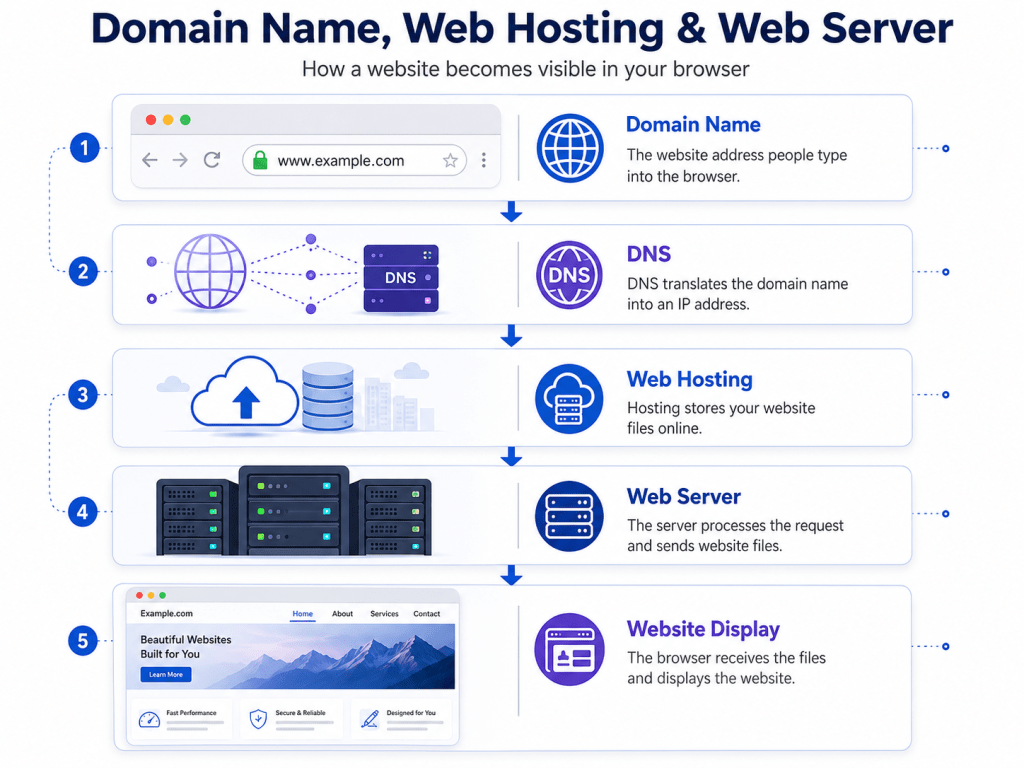
Every website — whether simple or complex — is built on four core components. Think of these as the foundation of a house. Without any one of them, the whole structure falls apart.
Domain Names
Quick Answer: A domain name is the human-readable address of a website on the internet. Instead of typing a string of numbers (like 192.168.1.1), you type a simple name like “skyhoora.com” to visit a website. Domain names are registered through domain registrars and must be renewed annually.
Your domain name is your website’s identity. It’s what people type into their browser to find you.
For example:
- google.com is Google’s domain name
- skyhoora.com is Skyhoora’s domain name
Domain names have two parts:
- The name itself — “skyhoora” in skyhoora.com
- The extension (TLD) — “.com”, “.in”, “.org”, “.net”
Choosing a good domain name is one of the first steps to building a website. It should be short, memorable, easy to spell, and relevant to your business.
Web Hosting
Quick Answer: Web hosting is a service that provides storage space on a server where your website’s files are stored. When someone visits your website, the hosting server delivers those files to their browser. Without hosting, your website has no place to “live” on the internet.
If a domain name is your website’s address, then web hosting is the land and building where your website actually lives.
Every website you visit is stored on a server — a powerful computer that stays connected to the internet at all times. Hosting companies like Hostinger, Bluehost, SiteGround, or AWS own thousands of these servers and rent out space to website owners.
Types of web hosting include:
- Shared Hosting — Multiple websites share one server. Affordable but limited. Good for beginners.
- VPS Hosting — Virtual Private Server. More resources, better performance. Good for growing websites.
- Dedicated Hosting — You get an entire server to yourself. Expensive but powerful. Good for large businesses.
- Cloud Hosting — Your website runs across multiple servers. Highly scalable and reliable.
Web Servers
Quick Answer: A web server is a computer program (and the hardware it runs on) that stores, processes, and delivers website files to visitors’ browsers over the internet. Popular web server software includes Apache and Nginx.
A web server has one primary job: to receive requests from browsers and respond by sending back the correct files.
When you type a URL and press Enter, your browser sends a request to a web server. The server finds the right files and sends them back to your browser. This entire process takes less than a second.
The most popular web server software in the world includes:
- Apache — Used by millions of websites. Open-source and reliable.
- Nginx — Known for speed and efficiency. Widely used for high-traffic websites.
- Microsoft IIS — Commonly used in Windows-based hosting environments.
Website Files
A website is made up of different types of files that work together to create what you see and experience:
| File Type | Purpose | Example |
|---|---|---|
| HTML | Structure and content | Headings, paragraphs, images |
| CSS | Visual styling | Colors, fonts, layout |
| JavaScript | Interactivity | Buttons, animations, forms |
| Images | Visual media | .jpg, .png, .webp files |
| PHP / Python | Server-side logic | Contact forms, login systems |
| Databases | Storing data | User accounts, blog posts |
When a browser loads a webpage, it downloads and processes all these files to display the final result you see on screen.
What Happens When You Type a Website Address?
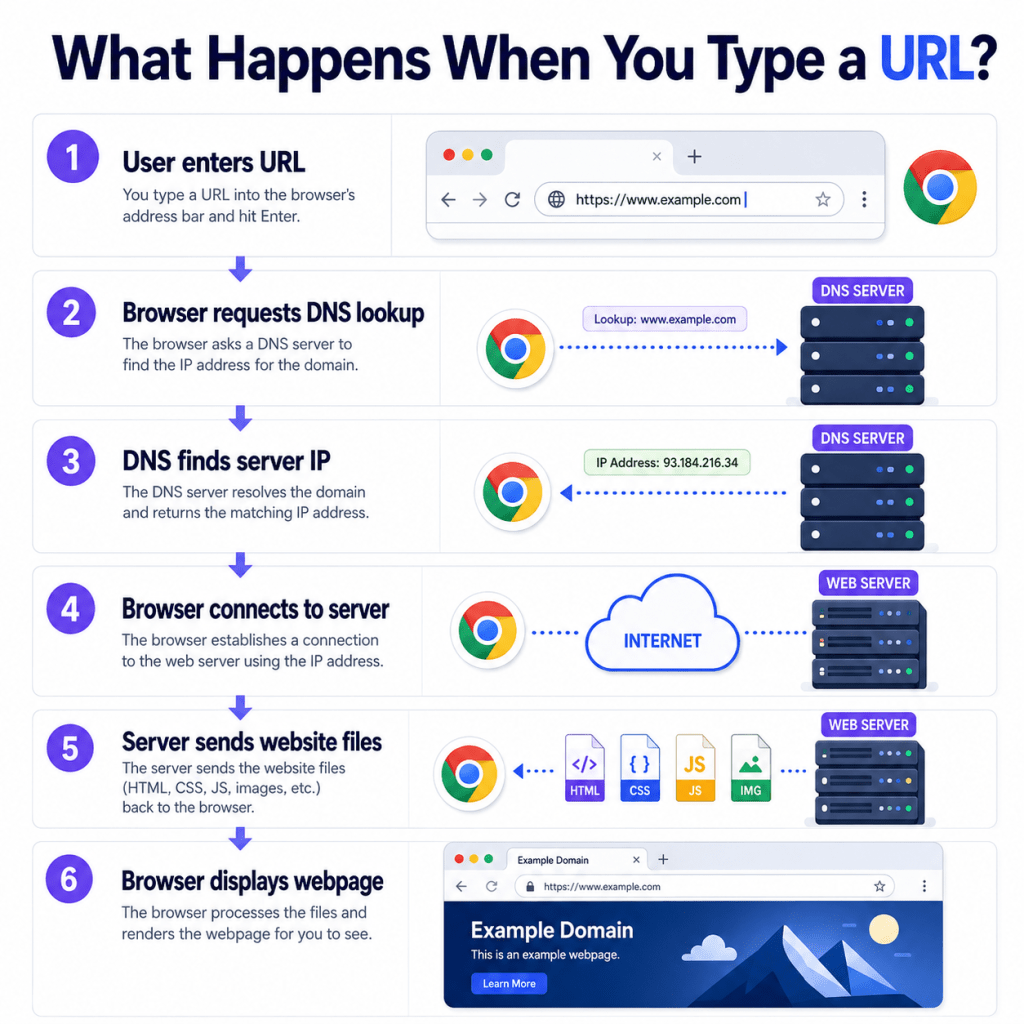
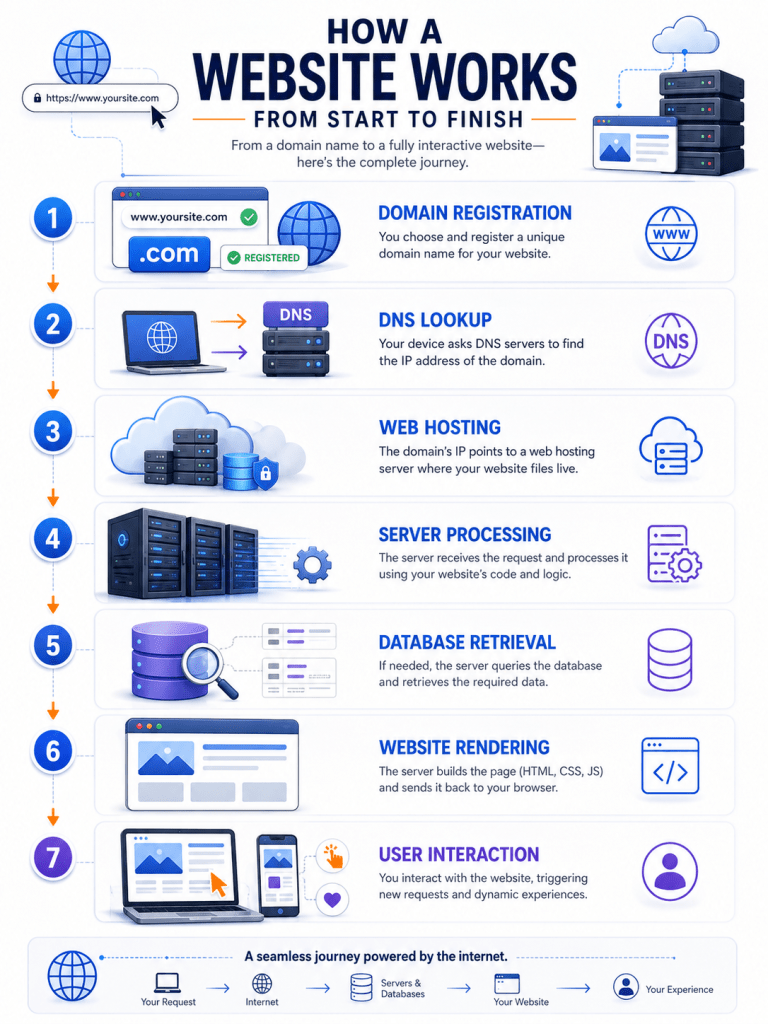
This is one of the most fascinating processes in all of technology — and it happens in under a second. Let’s walk through it step by step.
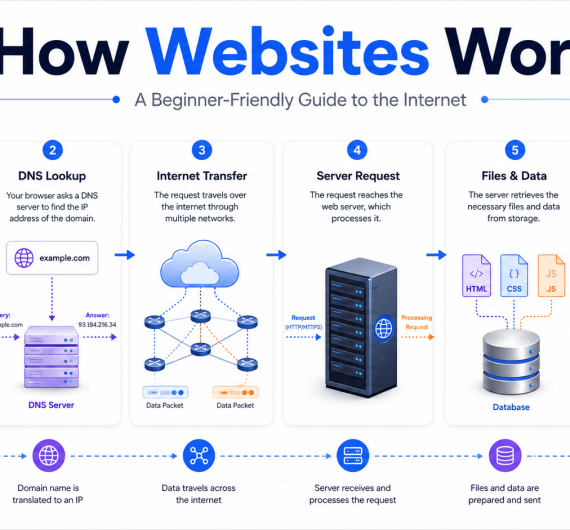
DNS Lookup Process
Quick Answer: DNS (Domain Name System) is the internet’s phonebook. It translates human-readable domain names like “skyhoora.com” into IP addresses like “203.0.113.1” that computers use to find each other. Without DNS, you’d need to memorize a string of numbers to visit every website.
When you type a domain name, your computer doesn’t actually understand “skyhoora.com.” Computers communicate using numerical IP addresses. So the first step is translating that domain name into an IP address.
Here’s how the DNS lookup works:
- You type skyhoora.com into your browser.
- Your browser checks its local cache — has it visited this website recently?
- If not, it asks your ISP’s DNS resolver for the IP address.
- The DNS resolver checks its own cache.
- If it doesn’t know the answer, it queries the root DNS servers.
- The root servers point toward the TLD nameservers (.com, .in, etc.).
- The TLD nameservers point to Skyhoora’s authoritative nameservers.
- The authoritative nameservers return the correct IP address.
- Your browser now knows where to go.
This entire chain of events happens in milliseconds.
Browser Request
Once your browser has the IP address, it sends an HTTP or HTTPS request to the web server at that address.
This request includes:
- The type of request (GET — “I want to see this page”)
- The URL you want to visit
- Your browser type and version
- Cookies (if any exist from a previous visit)
Think of it like calling a restaurant to place an order. You tell them what you want, and they prepare it for you.
Server Response
The web server receives your request and processes it.
If the page exists and everything is fine, the server sends back an HTTP 200 OK response along with the website’s HTML, CSS, JavaScript, and media files.
You may have seen these response codes before:
- 200 — OK. Page found and delivered.
- 301 — Permanently moved to a new URL.
- 404 — Page not found.
- 500 — Internal server error.
Page Rendering
Now your browser has received all the files. The final step is rendering — assembling all those files into the visual webpage you see.
Here’s what happens:
- The browser reads the HTML and builds the page structure.
- It applies CSS to style every element — colors, fonts, spacing.
- It executes JavaScript to add interactivity and dynamic features.
- Images and media files are downloaded and displayed.
- The final page appears on your screen.
The entire process — from typing the URL to seeing the loaded page — typically takes less than 2 seconds. Fast websites can load in under 1 second.
How Websites Work Behind the Scenes
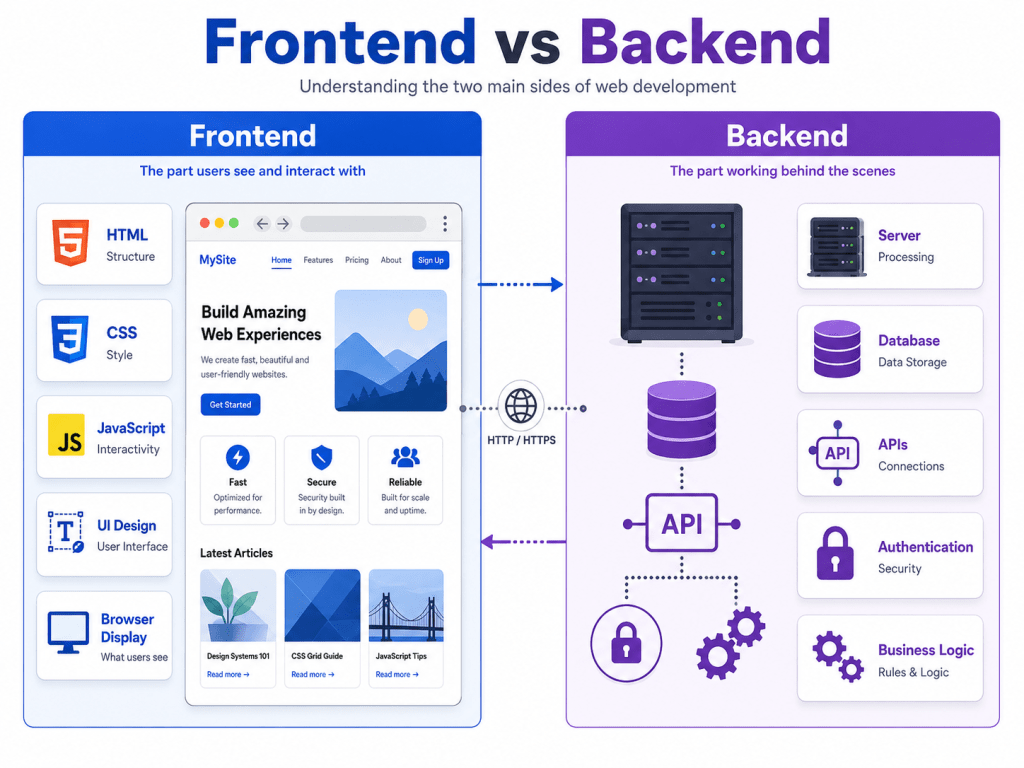
Most visitors only see the surface of a website. But underneath, there’s a complex system of technologies working together to deliver that experience.
Frontend Explained
Quick Answer: The frontend is everything you see and interact with on a website — the layout, colors, buttons, text, and images. It runs in your browser and is built using HTML, CSS, and JavaScript.
Frontend development is the art of creating the visual layer of a website. Everything you can see, click, scroll through, or interact with is frontend.
Key frontend technologies:
- HTML — The skeleton of a webpage. It defines headings, paragraphs, links, and images.
- CSS — The skin and clothes. It controls how everything looks.
- JavaScript — The muscles. It makes things move, respond, and behave dynamically.
Modern frontend frameworks like React, Vue.js, and Angular help developers build complex, fast, and interactive user interfaces.
Backend Explained
Quick Answer: The backend is the behind-the-scenes part of a website that users don’t see. It includes the server, database, and application logic that power a website. Backend code processes requests, manages data, and sends information to the frontend.
If the frontend is the shop floor, the backend is the warehouse, inventory system, and office combined.
When you log into a website, submit a contact form, or make a purchase — the backend processes all of that. It handles:
- User authentication (verifying your login)
- Processing payments
- Storing and retrieving data
- Sending emails and notifications
- Running business logic
Popular backend languages include PHP, Python, Node.js, Ruby, and Java.
Databases
Databases are where websites store all their information. Without a database, a website can’t remember anything — no user accounts, no orders, no blog posts.
Think of a database as a giant, organized spreadsheet. Every time you register on a website, your name, email, and password are stored in a database. Every time you post a comment, it’s saved in a database.
Common databases used in web development:
- MySQL — The most popular database for websites. Used by WordPress, among many others.
- PostgreSQL — Powerful open-source database.
- MongoDB — A non-relational database great for flexible data structures.
- Firebase — Google’s real-time database, popular for mobile and web apps.
APIs
Quick Answer: An API (Application Programming Interface) is a set of rules that allows different software applications to communicate with each other. APIs let websites integrate third-party services like payment gateways, maps, social media logins, and weather data.
APIs are the connectors of the modern internet. They allow one system to talk to another.
Real-world examples of APIs in action:
- When you log into a website using your Google account — that’s an API.
- When you see an embedded Google Map on a contact page — that’s an API.
- When an e-commerce website processes a payment via Razorpay or Stripe — that’s an API.
- When a chatbot on a website responds to your question — often an API call to an AI service.
Security and HTTPS
Quick Answer: HTTPS (HyperText Transfer Protocol Secure) is the secure version of HTTP. It encrypts data transferred between your browser and a website’s server, protecting sensitive information from being intercepted. Websites use SSL/TLS certificates to enable HTTPS.
You’ve probably noticed the padlock icon in your browser’s address bar. That padlock means the website is using HTTPS — a secure, encrypted connection.
Without HTTPS, data sent between your browser and a website travels in plain text. Anyone intercepting that data could read your passwords, credit card numbers, and personal information.
HTTPS encrypts that data, making it unreadable to anyone except the intended recipient. In 2026, HTTPS is not optional — it’s a basic requirement for every website.
How Modern Websites Work in 2026
The internet has evolved dramatically. Websites in 2026 are faster, smarter, and more sophisticated than ever before.
Cloud Hosting
Traditional web hosting used physical servers in a fixed location. Cloud hosting changed everything.
Cloud hosting distributes your website across multiple servers and data centers worldwide. This means:
- Higher reliability — If one server fails, another takes over instantly.
- Better scalability — Your website can handle sudden traffic spikes without crashing.
- Lower costs — You only pay for the resources you actually use.
Major cloud hosting providers include Amazon Web Services (AWS), Google Cloud Platform, and Microsoft Azure.
CDNs (Content Delivery Networks)
A CDN is a network of servers distributed across the globe. When someone visits your website, the CDN delivers your content from the server closest to that visitor.
For example, if your website is hosted in Mumbai but a visitor is accessing it from London, a CDN can deliver your content from a server in Europe — making the page load significantly faster.
Popular CDN providers include Cloudflare, Fastly, and Amazon CloudFront.
AI-Powered Websites
Artificial intelligence is now deeply integrated into the modern web. In 2026, AI powers:
- Chatbots and virtual assistants — Answering visitor questions in real time.
- Personalized content — Showing different content to different visitors based on behavior.
- Search functionality — Smarter, intent-based search within websites.
- Product recommendations — Suggesting relevant products based on browsing history.
- Fraud detection — Protecting e-commerce websites from fake transactions.
At Skyhoora, we help businesses integrate AI automation into their websites and marketing workflows to save time and grow faster.
Website Performance
Website speed is critical. Research consistently shows that users abandon websites that take more than 3 seconds to load. Google also uses page speed as a ranking factor.
Key metrics for measuring website performance include:
- Core Web Vitals — Google’s set of performance metrics (LCP, FID, CLS)
- Page Load Time — Total time to fully load a page
- Time to First Byte (TTFB) — How quickly the server starts responding
- First Contentful Paint (FCP) — When the first visual element appears on screen
Tools like Google PageSpeed Insights and GTmetrix help you measure and improve website performance.
Mobile Optimization
More than 60% of global internet traffic now comes from mobile devices. A website that doesn’t work well on smartphones is losing more than half its potential audience.
Mobile optimization includes:
- Responsive design — The website layout adapts to any screen size.
- Fast mobile loading — Images and code are optimized for slower mobile connections.
- Touch-friendly navigation — Buttons and menus are easy to tap on small screens.
- Readable text — Font sizes are appropriate without requiring zoom.
Google uses mobile-first indexing, meaning it primarily evaluates the mobile version of your website when determining search rankings.
How to Build Your Own Website
Thinking about building a website? Here’s a straightforward, beginner-friendly roadmap.
Step 1: Choose a Domain
Start by picking a domain name that represents your brand. Keep it:
- Short and easy to remember
- Relevant to your business
- Easy to spell and pronounce
- Ideally a .com, .in, or relevant TLD
Register your domain through providers like GoDaddy, Namecheap, or Google Domains.
Step 2: Choose Hosting
Pick a hosting plan based on your needs. For beginners, shared hosting from providers like Hostinger, Bluehost, or SiteGround is a great starting point. As your website grows, you can upgrade to VPS or cloud hosting.
Look for hosting that offers:
- Free SSL certificate
- Good uptime (99.9% or above)
- 24/7 customer support
- Easy WordPress installation
Step 3: Install WordPress
WordPress powers over 43% of all websites on the internet. It’s beginner-friendly, highly customizable, and supported by thousands of plugins and themes.
Most hosting providers offer a one-click WordPress installation. Once installed, you’ll have a complete website management system where you can write content, customize your design, and manage everything — no coding required.
Step 4: Design Your Website
Choose a professional WordPress theme that matches your brand. Customize it with your logo, colors, fonts, and content.
Popular free themes include Astra, OceanWP, and GeneratePress. For more advanced customization, page builders like Elementor let you design beautiful pages using drag-and-drop.
Step 5: Publish Your Website
Before launching, make sure you:
- Add all essential pages (Home, About, Services, Contact)
- Install an SEO plugin like Rank Math or Yoast SEO
- Set up Google Analytics to track visitors
- Test your website on mobile devices
- Set up an SSL certificate (HTTPS)
Once everything looks good — you’re live. Welcome to the internet.
Common Website Mistakes Beginners Make
Building a website is exciting, but many beginners fall into avoidable traps. Here are the ten most common mistakes — and how to fix them.
1. No Clear Purpose
Many websites try to do everything and end up doing nothing well. Define your website’s primary goal before you build it. Is it to generate leads? Sell products? Provide information?
2. Choosing a Bad Domain Name
A long, complicated, or misspelled domain name hurts your brand. Choose something clean, simple, and professional.
3. Using Cheap or Unreliable Hosting
Slow or frequently down hosting kills user experience and SEO rankings. Invest in reliable hosting from a reputable provider.
4. No SSL Certificate (HTTPS)
Running a website on HTTP in 2026 is a serious mistake. Browsers now flag non-HTTPS websites as “Not Secure,” which drives visitors away instantly.
5. Ignoring Mobile Optimization
If your website doesn’t work well on smartphones, you’re losing more than half your audience. Always test your website on multiple devices.
6. Slow Page Speed
Large, uncompressed images and bloated code slow down websites significantly. Use image compression tools and a caching plugin to improve speed.
7. No SEO Strategy
Building a website without SEO is like opening a shop in a basement with no signage. Make sure every page is optimized with the right keywords, meta titles, and descriptions.
8. No Clear Call-to-Action
Visitors arrive at your website but don’t know what to do next. Every page should have a clear CTA — whether it’s “Book a Call,” “Buy Now,” or “Contact Us.”
9. Ignoring Website Analytics
Without tracking your visitors, you have no idea what’s working and what isn’t. Install Google Analytics from day one.
10. Not Updating Content
A website with outdated content or a blog that hasn’t been updated in years sends a bad signal to both visitors and search engines. Keep your content fresh and relevant.
Key Takeaways
Here’s a summary of everything you’ve learned in this guide:
- A website is a collection of pages stored on a server and accessed through a domain name.
- Every website needs four core things: a domain name, web hosting, website files, and a web server.
- When you type a URL, a process called DNS lookup translates the domain name into an IP address that points to the correct server.
- The frontend is what visitors see — built with HTML, CSS, and JavaScript.
- The backend powers everything behind the scenes — databases, server logic, and APIs.
- HTTPS is essential for security, trust, and SEO rankings.
- Modern websites use cloud hosting, CDNs, and AI to deliver faster, smarter experiences.
- Building a website starts with choosing a domain, getting hosting, and installing WordPress.
- Common mistakes include ignoring mobile optimization, skipping SEO, and using slow hosting.
Ready to Build a Professional Website for Your Business?
Whether you need a brand-new business website, a complete website redesign, SEO, local SEO, social media marketing, Google Ads, or AI automation — Skyhoora can help you build a strong online presence and grow your business.
Our team of digital marketing and web professionals works with businesses across Delhi and India to create websites that not only look great but also rank on Google, attract real customers, and deliver measurable results.
Get Your Free Consultation → skyhoora.com
Frequently Asked Questions (FAQ)
1. How does a website work?
A website works by storing files (HTML, CSS, JavaScript, images) on a web server. When you visit a website, your browser sends a request to that server. The server responds by sending the website files to your browser, which then renders and displays the page. This process happens within milliseconds and relies on DNS, HTTP/HTTPS protocols, and web servers working together.
2. What happens when I enter a URL?
When you enter a URL, your browser first performs a DNS lookup to find the IP address associated with that domain. It then sends an HTTP/HTTPS request to the web server at that IP address. The server processes the request and returns the appropriate files. Your browser downloads and renders those files, displaying the finished webpage on your screen — usually in under two seconds.
3. What is the difference between a domain and hosting?
A domain name is your website’s address on the internet (like skyhoora.com), while web hosting is the storage space where your website’s files actually live. Think of it this way: the domain is your street address, and hosting is the building at that address. You need both to have a functioning website. They are purchased separately but linked together through DNS settings.
4. What is DNS?
DNS stands for Domain Name System. It’s the internet’s phonebook — a system that translates human-readable domain names like “skyhoora.com” into numerical IP addresses like “203.0.113.1” that computers use to communicate. Without DNS, you’d have to memorize long strings of numbers to visit every website. DNS servers are maintained globally and resolve billions of queries every day.
5. How do websites connect to the internet?
Websites connect to the internet through web hosting servers that maintain a constant, high-speed internet connection. These servers are housed in data centers with redundant power supplies, cooling systems, and multiple internet connections to ensure they’re always online. When someone visits a website, data travels through the internet’s infrastructure — routers, cables, and data centers — to reach their browser.
6. What is a web server?
A web server is both software and hardware that stores website files and delivers them to browsers over the internet. When your browser requests a webpage, the web server receives that request, locates the appropriate files, and sends them back. Popular web server software includes Apache and Nginx. Hosting providers operate large numbers of web servers in data centers to host thousands of websites simultaneously.
7. What is frontend development?
Frontend development refers to building the visual, user-facing part of a website — everything visitors see and interact with directly. Frontend developers use HTML to structure content, CSS to style and design elements, and JavaScript to add interactivity and dynamic functionality. A good frontend ensures the website is visually appealing, easy to navigate, and works well across all devices and screen sizes.
8. What is backend development?
Backend development involves building the server-side logic that powers a website behind the scenes. It includes managing databases, processing user requests, handling authentication, running business logic, and connecting to third-party APIs. Backend developers work with languages like PHP, Python, Node.js, and Ruby. While users never see the backend directly, it’s responsible for everything a website actually does — storing data, processing payments, and delivering personalized content.
9. Can I create a website without coding?
Yes, absolutely. Platforms like WordPress, Wix, Squarespace, and Shopify allow anyone to build professional websites without writing a single line of code. WordPress is the most popular option, powering over 43% of all websites. With drag-and-drop page builders like Elementor, you can design custom layouts visually. However, for complex, high-performance, or custom-built websites, professional developers can add significant value.
10. How much does a website cost?
Website costs vary widely depending on complexity and requirements. A basic website using shared hosting and a free WordPress theme can cost as little as ₹3,000–₹8,000 per year (domain + hosting). A professionally designed business website built by an agency typically costs ₹15,000–₹80,000 or more as a one-time project. Ongoing costs include hosting, domain renewal, maintenance, and SEO services. It’s best to contact Skyhoora for a custom quote based on your specific needs.
11. What is WordPress?
WordPress is the world’s most popular content management system (CMS), powering over 43% of all websites on the internet. It’s an open-source platform that allows you to build, manage, and update websites without coding knowledge. WordPress offers thousands of free and premium themes for design and plugins for added functionality — from SEO tools to e-commerce systems. It’s beginner-friendly yet powerful enough for enterprise-level websites.
12. Why do websites need SSL certificates?
SSL (Secure Sockets Layer) certificates enable HTTPS on a website, encrypting the data transferred between a visitor’s browser and the web server. This protects sensitive information like passwords, credit card numbers, and personal data from being intercepted. Beyond security, SSL certificates are essential for trust — browsers show a padlock icon on HTTPS sites and flag HTTP sites as “Not Secure.” Google also gives a small ranking boost to HTTPS websites.
13. How long does it take to build a website?
The timeline depends on complexity. A simple one-page website can be built in a day. A standard business website with five to ten pages typically takes one to three weeks when built professionally. A custom e-commerce store or a feature-rich web application can take one to three months or longer. Planning, design, development, content creation, and testing all factor into the timeline. Starting with a clear brief and organized content significantly speeds up the process.
14. How do websites make money?
Websites generate income through several models. E-commerce sites sell products directly. Service websites generate leads that convert into clients. Blogs and content websites earn through advertising (Google AdSense), affiliate marketing, and sponsorships. Membership sites charge subscription fees for premium content. SaaS (Software as a Service) websites charge monthly fees for software tools. Most successful websites combine multiple revenue streams to build sustainable income.
15. What is the future of websites?
The future of websites is being shaped by AI, voice search, and immersive experiences. AI-powered personalization will make websites dynamically adapt to each visitor’s preferences in real time. Voice search optimization will become critical as more people use smart speakers and voice assistants. Progressive Web Apps (PWAs) will blur the line between websites and mobile apps. Additionally, Web3 technologies, faster connection speeds, and smarter CDNs will make websites even faster and more intelligent by 2030.
How Websites Really Work: Bringing the Internet to Life
The internet is one of the most remarkable inventions in human history — and every website you visit is a small miracle of technology working silently in the background.
Now you know exactly how it all fits together. You understand domain names, web hosting, DNS, servers, frontend, backend, databases, APIs, HTTPS, and the incredible journey your browser takes every time you visit a webpage.
Whether you’re building your first website or trying to improve an existing one, this knowledge gives you a real foundation to make smarter decisions.
And if you ever need expert help turning that knowledge into a professional website that ranks on Google, attracts customers, and grows your business — Skyhoora is here to help.